
 Email Extractor Plus
Email Extractor for Chrome
Open any site and Email Extractor Plus lists every email address on it, tagged and ready to copy. Paste up to 1,000 URLs and it visits them for you — and when a company's homepage shows no email, it looks inside their contact, about or imprint page and keeps going.
Your library, in your account
Saved emails go to your account, with a copy on this device. Never sold, never shared with third parties.
Up to 1,000 URLs per run
Queue a list of company sites, or import every link from the page you are looking at.
TXT, CSV and XLSX
Eight columns, so you can trace every row back to the page it came from.
See it in 55 seconds
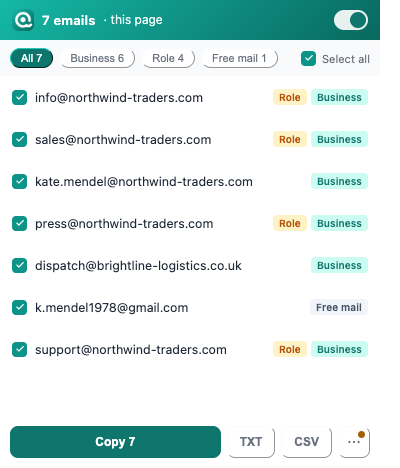
Open a page, click the icon, and every address on it is listed and labelled.
From a list of company sites to a clean list of emails
Most lead lists start as a pile of company websites — from a directory, a map listing, an exhibitor page, a search result. Getting an email out of each one is where the afternoon goes.
Collect the links
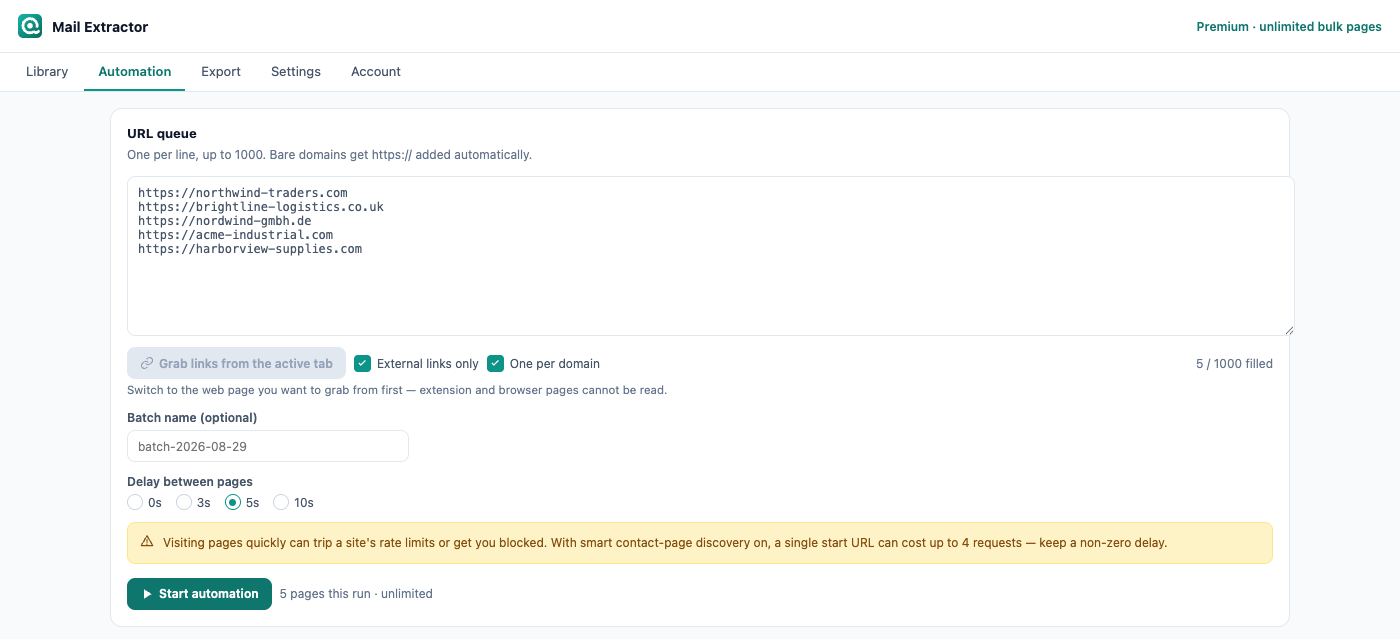
Import every link from the page you are looking at, or paste your own list. Up to 1,000 addresses, one per line.
Let it visit them
Email Extractor Plus works through the queue in its own window. Live progress, current domain, and a stop button you can hit at any time.
It goes one level deeper
When a homepage has no email on it, Email Extractor Plus looks for that site's contact, about, team or imprint page and scans that instead.
Export what you need
Filter by label, then export to TXT, CSV or XLSX. Every row carries where it came from.
The emails that other extractors miss
A company's front page rarely shows an email address. Most extractors scan it, find nothing, and record a zero — leaving you unable to tell whether the site had no address or the tool simply didn't look.
Email Extractor Plus looks. It reads the page's own navigation for contact, about, team, imprint, kontakt or contacto links, and falls back to the paths those pages usually live at. It stays on the same domain, goes exactly one level deep, and gives up cleanly when there is nothing there.
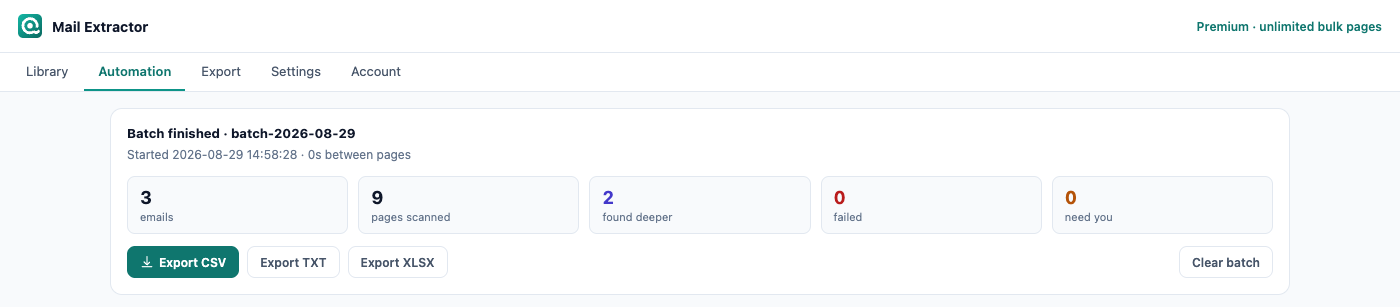
A real run on six sample sites: 12 pages checked, 14 emails, 5 of them found one level down on contact pages.
Every address arrives already sorted
Scraped lists are usually a mess of info@, sales@, personal Gmail accounts and real people, all mixed together. Email Extractor Plus marks each address with coloured dots as it finds it, so you can filter before you export instead of cleaning a spreadsheet afterwards.
On a company's own domain rather than a public mail provider.
info@, sales@, support@, contact@ and the like.
Gmail, Outlook, QQ, 163 and other public providers.
Taken from a mailto: link. The highest confidence there is.
Discovered on a contact page rather than the page you originally queued.
Nothing is thrown away quietly, either. The list of valid top-level domains updates itself, so an address at a .dev, .app or .io domain isn't silently discarded — and anything on an unfamiliar domain is kept and flagged for you to judge.
It reads the page the way you see it
Most extractors run a regular expression over a page's raw HTML. That is why they hand you image alt text, tracking IDs and fragments of JavaScript alongside real addresses.
Email Extractor Plus walks the page's text nodes instead, so markup never enters the results — highlighted search results and split-up text don't produce broken addresses. It also reads the live page, which means addresses a site renders with JavaScript are picked up, the kind that server-side tools fetching raw HTML never see.
On long pages it only re-scans what actually changed, so infinite-scroll directories stay responsive while you scroll.
What this replaces
| Doing it by hand | A basic extractor | Email Extractor Plus | |
|---|---|---|---|
| Finding one company's email | Open the homepage, hunt for the contact page, copy by hand | Scans only the page you gave it | Checks the contact page automatically when the homepage has none |
| 100 websites | An afternoon | Open each one in a tab yourself | Paste the list and come back when it is done |
| Telling info@ from a real person | Read every row | All mixed together | Labelled as found, filter before you export |
| Knowing where a row came from | Keep your own notes | Email and source URL only | Eight columns, including the starting URL and batch name |
Free to use. Pay only for the parts that save you the most time.
Extracting emails from the pages you open is never limited. Premium adds a much larger library, contact-page checks, XLSX export and higher daily bulk limits.
Free
No account, no card, no time limit.
- Unlimited extraction on any page you visit
- Import every link from the current page
- Bulk search
- Auto-save to your searchable library
- Export to TXT and CSV
- A starter amount of library storage, more once you sign in
Premium
Everything in Free, plus the parts that do the digging.
- A much larger library
- Contact page discovery, on bulk runs and on demand
- Export to XLSX
- Higher daily bulk limits
Try it on a sample page
Our guide on finding company email addresses has two live sample contact pages built into it. Open it, click the extension icon, and see exactly what it reads and how it labels each address — before you point it at anything of your own.
Open the sample page →Your library and your data
The page you are on is read inside your browser, and the page itself never leaves your computer. When an address is saved to your library, that record goes to your account: the address, the page it was found on, the page title, the domain and its labels. A copy stays on this device, so search, filtering and export are instant and work offline.
"Save to account" is on by default. Switching it off in Settings stops any further uploading; it does not delete what was already uploaded. Delete a record in the extension and it is deleted from your account too. We never sell your data and never share it with third parties.
The extension asks for access to all sites because you are the one who decides which page to extract from — there is no way to know in advance which sites those will be. That access is used for exactly one thing: reading the page you are on to find the addresses displayed on it.
Read the full privacy policyFrequently Asked Questions
Have questions? We're here to help you.
Yes. It reads whatever page you have open — a directory listing, a company site, a search results page. There are no site-specific rules, so nothing breaks when a site redesigns.
That is the case it was built for. Email Extractor Plus looks at the page's own navigation for a contact, about, team or imprint link — matching in several languages — and falls back to the paths those pages usually live at. It stays on the same domain and goes exactly one level deep.
Emails you save to your library are stored in your account, with a copy on your device so search and export work offline. The record holds the address, the page it was found on, the page title, the domain and its labels; the page itself is never uploaded. "Save to account" is on by default and can be switched off in Settings, which stops further uploading but does not delete what was already uploaded. Deleting a record in the extension deletes it from your account too. Your data is never sold and never shared with third parties.
Because you decide which page to extract from, the extension cannot know in advance which sites it will need. That access is used only to read the page you are on in order to find email addresses displayed on it. It does not modify pages and does not inject anything into them.
Up to 1,000 per run. You can paste a list yourself, or use Import links from a page to collect every link on the page you are looking at.
Yes. Every address is labelled as it is found — Company, Generic (info@ and the like), Free mail, taken from an email link, or found on a contact page — and shown as coloured dots. Filter by label before you export.
Collecting addresses that are publicly published on a website is generally lawful. What you then do with them is governed by the law where you and your recipients are located — the GDPR in Europe and the CAN-SPAM Act in the United States both restrict unsolicited commercial email. Please check your obligations before you send anything.
Stop opening contact pages by hand
Install it, open any site, and see what is on the page. No card needed.
Email Extractor Plus collects addresses that are already published on public web pages. It does not bypass logins or touch private data. How you use those addresses is up to you and is subject to the law where you and your recipients are — sending unsolicited bulk email is restricted in many places, including under the GDPR and the CAN-SPAM Act.